
Tuesday, 14 May 2013

M2
In the creation of my website I used navigation. I made links that would allow people to go through each aspect of the website and also allow people to go back through each of the pages. These links would make sure that when people clicked the link, it would go to the correct page. In my website there is also a form on the reviews page. This allows people to effectively put in their reviews about films by selecting the film they want to write about, a comment box for them to write the review and a submit button which allows them to put their review onto the website. I made this on Dreamweaver by selecting the features that I wanted on my form for example, a drop down box (list/menu) for people to select a film, a text field for people to enter their comment and a button so they could submit the review. I also added a list/menu on the payments page. This allows people to select the film that they want to buy. I have also added visual and audio elements to my website. This involves pictures of different films. This is also a timed based animation as the images switch after a certain amount of time. I did this on fireworks and I created it by making different frames with the same images but in different places so when it was animated it would look like the images had moved. I changed the timing on the frames to change every second so the images didn’t swap to fast. I have also added trailers of each of the films available onto the website so people are able to watch theses trailers through the website.


Friday, 26 April 2013
P4 - Task 3

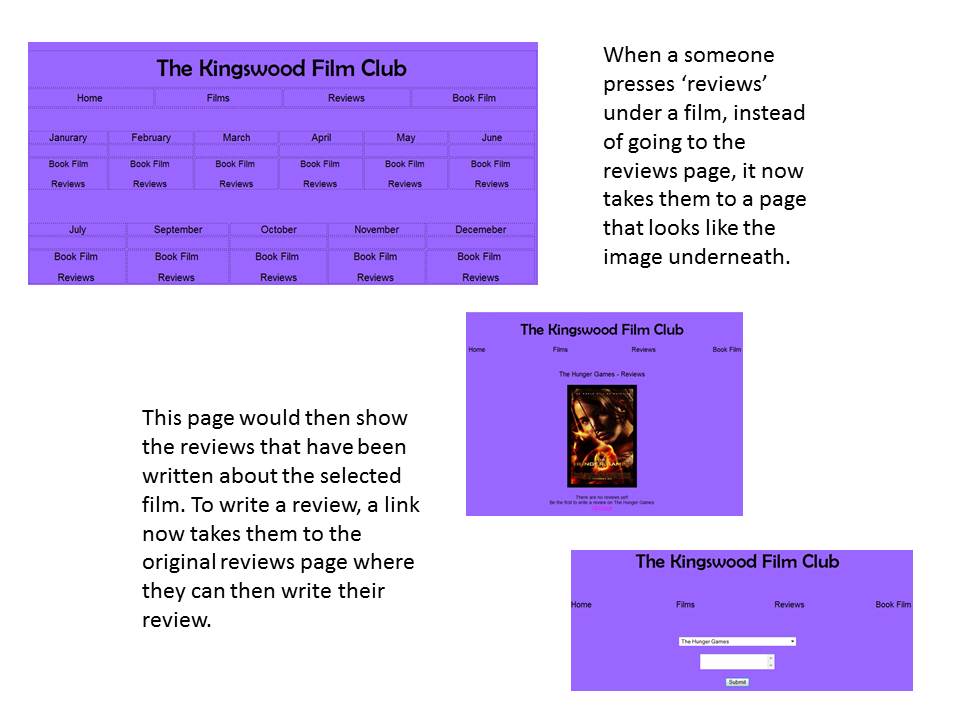
The home page has links to each page so people dont have to go through the whole website to book a film and they can go to whatever page straight from the home page.

This page allows people viewing the page to see what films are available to watch each month. It also gives them a chance to watch the trailer before booking the film.

This page allows people to watch the trailers so they can decide whether they want to book the film.

The reviews page allows people to write a review about the a film available. Other people will see these reviews which will allow people to decide if they want to watch the film.

The payments page allows people to chose which month which will select the film and what date they want to watch the film.
Tuesday, 23 April 2013
P3 - Task 2
Hacking involves re-programming a system that is
not authorised by the owner or designer. If a website was to be hacked it could
mean that customer’s details could be accessed and details of the company and
the price of products could be changed. If a website is hacked into, the person
who hacked into it has the ability to change anything that is on the website.
Viruses can cause many problems and can damage a
computer. Viruses can copy themselves which means they can access the whole
computer which then infects it. If a virus has infected a website, it doesn’t
only infect the owner’s computer but it spreads to other users once they have
entered the website. This can mean that the website would become unresponsive
and not work if it has been infected.
Identity theft involves using someone else’s
identity to access specific things and also to make money. Many people share
their details and personal information on the internet because they think that
it is secure however, personal information can be easily accessed through the
internet. If someone can hack into a website, it would be easier for them to
receive any information that they have given.
Firewalls are there to block unauthorised access
and can be in hardware and software form. The firewall prevents any unwanted
programmes coming in or going out of a network. This can also allow or deny
access based on a set of rules.
Secure socket layers (SSL) encrypt sections of
network connections using a keyed message authentication code. If a website doesn’t
show that it is a secure website, customers are more likely to visit.
A company/website that stores details is Argos. The
screen shot shows that the website is secure to use online shopping on the
website and the terms and conditions of the company.


P2 - task 2
There are many different factors
that can affect the way the internet and web pages perform. One factor is the
download speed. The download speed is the pace that data comes from a source to
your computer when connected to the internet. This factor can affect the
performance of any webpage because it can affect the multimedia on the page. Another
user side factor that can affect the performance of a website is PC performance
factors which include browser, cache memory and processor speed. The browser
can affect the performance of a website because some browsers do not support
certain files and if the browser is not updated and you have an older version
of the browser it can slow the performance down and you may not have some of
the features you need. Cache memory is another PC performance factor that can
affect the performance of a website. The cache memory stores instructions that
are constantly required to run a program. This means that programs can run
quicker. If there isn’t enough cache memory, it could mean that certain things
may load slower because it is not stored in it. The processor speed is another
factor that that can affect the performance of a website. By having a fast
processor it means that the website can hold more information.
Server side factors can also
affect the performance of a website. A server side factor can include the web
server capacity which involves available bandwidth, executions to be performed
before page load. The available bandwidth is the internet speed and number of
hits. This can affect the performance of the website if you only have limited
internet so things may not load and you may not be able to see things such as
pictures. Executions to be performed before the page loads are another factor
that can affect the performance of a website. Certain things such as the
background and colours may load first and other multimedia may load slowly and
come up on to the website bit by bit. The number of hits is a request to a
server that hosts the web page. The number of hits is the number of files that
are requested. File types can also affect the performance of a web page because
certain file types may not always been seen on some browsers meaning that some
multimedia may not be viewable to the user. This can involve flash that is a
browser add-on and not all browsers may have installed this. If all pictures
were saved in the format of a JPEG, it should be able to be viewed by all
users.
Friday, 19 April 2013
Task 1 - M1
Web 2.0 was created in 1990 and it allows users to interact through social media including Twitter and Facebook. A difference between the traditional World Wide Web and web 2.0 is that there is a better link between internet users, other users and content providers.
Blogs can be a discussion or informational page published on the World Wide Web which consists of posts where the most recent post would appear first. A blog is an interactive page which allows people to leave comments which could be seen as a form of social networking. Blogs can be personal; however they can be used as advertisement for a company.
Online Applications are used by people who are on the internet. These applications can mainly only be used by people who are connected to the internet.
Cloud Computing is the use of computing resources including hardware and software that is delivered over the internet. An example of cloud computing is Google drive. This involves uploading something into the application and this then store what has been uploaded and can be accessed from anywhere as long as you are connected to the internet.
Thursday, 21 March 2013
Unit 28 - P1
The Flow of Information
There are many different stages information has to
go through. The first stage is at the computer when a web address is put in
which is the domain name. Once the enter button has been pressed, it goes to
the next stage which is the router. Routers are used to take packets to the
next step which is the ISP (internet service provider). An internet service
provider is where you get your broadband from for example, sky, virgin and BT.
The data packets go through your ISP and the packets then go to the domain name
server. The domain name server is the place where it tells the packets to go.
The IP address is then found. An IP address is unique to a computer and this is
how website can be found. The IP address is used to then go to the host which
is represented by its own IP address. This is the space where the website is.
Once the packets have got to the host, the packets go back through the process
in the exact same order. It has to go back through the process in order to find
the IP address for the computer that you are on. If it doesn't do this then the
website cannot go through and it will be lost.Hardware Components
The web also known as the World Wide Web is a system that is accessed through the internet. Web pages can include text, images, videos and all different types of multimedia and this can be navigated by hyperlinks.
Proxy Servers are a server that is used to ensure security and control between a workstation and the internet. This is also used when a request is moved such as a web page request. The proxy server looks into its local cache of recent history. If it has already been downloaded it can receive it faster. If the web page is not recognised and not in the local cache, the proxy server uses the IP address to request the page from the server and this is then forwarded to the user.
Mail Server is used when people send emails. The email will go through an email server when on its way to the intended recipient. The mail server is also a storage area for where the email is stored for the users.

Tuesday, 12 March 2013

Friday, 8 March 2013
D2 - Unit 43
‘I think maybe that some of the graphics can be a little clearer, especially the waiting chairs in the waiting room at the beginning’ was the first amendment I was giving. By making this amendment, it makes the product look more professional as images are sharper and doesn’t look pixelated or messy. Also by making the chairs in the waiting room clearer, it makes it look more lifelike.
‘The page at the very beginning of the product gives the audience a glimpse of the course name, etc. I think that it could possibly stay on the screen for longer as it is a little quick and the audience may not see it before it disappears’. This was the next amendment that was suggested. To do this I changed the tempo or the frame and made it wait for 4 seconds. By doing this, it allows people to clearly see the title of the product and clearly tells them what it is about.
‘In addition, I really like the blue doors at the start, which determine Year 12 and Year 13. However, I think to let the audience acknowledge where they are, a little sign which says something like ‘Health and Social Care’ should be above the door’. I think this amendment bought an advantage to my product because it is a reminder of what they are looking in to. It also makes it look like a sign in a building so people don’t confused when they go into the main navigation page.
‘Maybe the signs which say “please take a seat” and “exit” could look a little more like they’re in a hospital. Perhaps they could be stuck on a corkboard with a pin or perhaps a silver sign with black engraved letters, so it could suit the theme of the hospital more’. This amendment made my product look more like a hospital waiting room as the sign has the same design as a sign that would be in a hospital. This doesn’t make it look just like a room and also shows a bit more navigation because of the arrows which could indicate that they need to click a chair to go to the next part of the product. It also keeps the theme of the product which makes it not lose the purpose of it.
‘Maybe the two blue doors could have a floor, perhaps a tiled floor which would reflect the theme of the hospital, so the doors would seem less like they’re floating’. This was the last amendment I was given. I think by adding a floor it made it look more realistic and not like the doors a floating like mentioned in the amendment. I think this makes it look more professional because there is more detail and makes it look as if the audience were in an actual room.

On the page that focuses on unit 7, I would make the arrows on the diagram rotate so it emphasis that it is a cycle which would make people understand the diagram.I would do this by making the arrows into a separate picture and I would animate them so they would rotate.
 On the waiting room, I would have an
image going one side of the room to the other that showed someone getting
rushed through. This would make it seem as if the audience was still in the
same setting and it emphasis the hospital theme. I would do this by using an
animation which moved the picture from one side of the page to the other which
would make it look like it is being taken to another part of the room.
On the waiting room, I would have an
image going one side of the room to the other that showed someone getting
rushed through. This would make it seem as if the audience was still in the
same setting and it emphasis the hospital theme. I would do this by using an
animation which moved the picture from one side of the page to the other which
would make it look like it is being taken to another part of the room.
On each of the waiting rooms, I would have some audio which would describe where they are, for example, ‘welcome to the year 12/year 13 waiting room’ and would tell them what they had to do for example, if they didn't know they needed to click a chair. This would mean that people would fully understand what was happening. Graphical images cannot be used to show this as it would just be background noise, however, small speakers could be put in the corners of the room like it would be in reality.
Wednesday, 6 March 2013
Tuesday, 26 February 2013
task 6 - evaluation of klejda's
Evaluation
on Klejda’s product
After looking through the who product, it is clear that
the product is fit for purpose. For example the whole thing clearly informs
people about the course its self and what is expected of people chosing to
study at The Kingswood School sixth form. This makes the product professional
because it includes all the details that students would need and want to know
if they were interested. The media used in the product is very appropriate for
the purpose of it. It has pictures that relate to the course for example, it
has pictures that have been done by students who take part in the course. This
also gives students who want to do this
course an idea of what they will doing and the types of artwork the course
includes. There are no obvious errors on the product and everything works
correctly and smoothly. I feel that overall the product is professional. I
think this because the same font is used throughout the product which makes it
look neat. I think the main page also makes it look professional because it is
spread out and placed neatly and all the frames don’t look cramped together and
everything looks like it has been placed in a certain way so it doesn’t look
messy.
Improvements
In the gallery to make each picture be shown for
the exact same amount of time so it all runs smoothly.
·
In the gallery to have buttons that control the
pictures like a pause, back and forward button so people can stop the pictures
if they want to look at them more closely without it moving and they go also go
back to the picture before if they missed it.
·
In as and a2, put more information about each
unit to give people a better understanding of what it involves.
·
In the gallery, put the pictures on a loop so
they don’t just stop and people can keep looking at them until they want to go
to a different frame.
·
Make a border between the pictures and the
frames so each side is all the same length away from the frame.
Thursday, 21 February 2013
Task 5 - Unit 43
Legal requirements
It is important to follow design laws to avoid plagiarism. The sources of pieces of media have to be considered to make sure copyright laws are adhered to because you cannot pass something as your own if someone else has created it. In my product I created two images including The Kingswood Children’s Centre and an image that looks like a cycle. The rest of the images were taken from different websites which are all listed below.
Waiting room picture - http://www.123rf.com/photo_14307884_waiting-room.html
Alcohol - http://www.talktofrank.com/drug/alcohol
Barnardos - http://www.bgccharityday.com/portfolio/barnardos/barnardos/
Bupa - http://www.dementiaaction.org.uk/info/2/action_plans/18/bupa
One to one - http://www.tenantscreeningblog.com/landlord-tips/tips-for-improving-landlord-tenant-communication/
Door - http://chinadortek.en.hisupplier.com/product-528789-automatic-swing-doors.html
Drugs u1 - http://rifestuff.blogspot.co.uk/2011/05/illegal-drugs-why-do-people-turn-to-it.html
Drugs u8 - http://www.telegraph.co.uk/comment/9314600/Why-do-some-people-want-drugs-to-be-legal.html
Elderly care - http://www.telegraph.co.uk/finance/budget/9161511/Budget-2012-Elderly-care-bills-could-rise-to-100000.html
Epidemiology – http://www.kmle.co.kr/search.php?Search=genitourinary+region&SpecialSearch=HTMLWebHtdig&Page=2
Friends and family - http://www.fitnessinferno.ca/2013/02/01/februarys-friends-family-blowout/
Group communication - http://andreaearlychildhood.blogspot.co.uk/
Growing up - http://positivemed.com/2012/05/28/growing-up/
Healthy eating - http://healthyeatingworks.co.uk/healthy-eating-tips/
Hospital - https://www.google.co.uk/search?q=hospital&hl=en&tbo=d&source=lnms&tbm=isch&sa=X&ei=VmwjUabIAo-X0QXP_IHYAw&ved=0CAoQ_AUoAQ&biw=1440&bih=775#imgrc=DNEg4Ebriy7g9M%3A%3BCIG2l71Vw9vBmM%3Bhttp%253A%252F%252Fwww.findingbetteragencies.com%252Fwp-content%252Fuploads%252FHospital.jpg%3Bhttp%253A%252F%252Fwww.findingbetteragencies.com%252F2013%252F01%252Fhospital-agency-search-a-different-agency-animal.html%3B802%3B599
Kingswood logo - http://www.numu.org.uk/station_about.asp?lngSiteID=4544
Nature nurture - http://www.phdinparenting.com/blog/2010/12/20/nature-nurture-and-more-books-that-influenced-me.html
NHS - http://thebackbencher.co.uk/the-nhs-universal-public-healthcare-an-outdated-concept/
Notepad - http://www.canstockphoto.com/notepad-with-pen-9709264.html Present - http://inhernewromanticway.blogspot.co.uk/2011/12/christmas-present-formula.html
Personal space - http://en.wikipedia.org/wiki/Personal_space Couch - http://thefurnituredeal.blogspot.co.uk/2012/11/tips-and-tricks-for-keeping-your-couch.html
Unwell – http://www.clipartpal.com/clipart/animal/fish_167682.html
Road Safety - http://www.widgit.com/resources/lifeskills/safety/road_safety/index.htm
Safe sex - http://www.clickstart.org.uk/page/view/id/20187
Cigarette –http://www.lshtm.ac.uk/newsevents/news/2012/new_health_warning_over_tobacco_policy_.html
Sneezing - http://txcowboydancer.com/2013/01/09/the-best-laid-schemes-o-mice-an-men/
Question mark - http://www.gettyicons.com/free-icon/103/pretty-office-2-icon-set/free-faq-icon-png/
Washing hands - http://ewspider.wordpress.com/2009/05/02/wash-wash-wash-your-hands/
X-ray - http://www.spacedaily.com/reports/New_Lung_Cancer_Screening_Tool_999.html
Waiting room picture - http://www.123rf.com/photo_14307884_waiting-room.html
Alcohol - http://www.talktofrank.com/drug/alcohol
Barnardos - http://www.bgccharityday.com/portfolio/barnardos/barnardos/
Bupa - http://www.dementiaaction.org.uk/info/2/action_plans/18/bupa
One to one - http://www.tenantscreeningblog.com/landlord-tips/tips-for-improving-landlord-tenant-communication/
Door - http://chinadortek.en.hisupplier.com/product-528789-automatic-swing-doors.html
Drugs u1 - http://rifestuff.blogspot.co.uk/2011/05/illegal-drugs-why-do-people-turn-to-it.html
Drugs u8 - http://www.telegraph.co.uk/comment/9314600/Why-do-some-people-want-drugs-to-be-legal.html
Elderly care - http://www.telegraph.co.uk/finance/budget/9161511/Budget-2012-Elderly-care-bills-could-rise-to-100000.html
Epidemiology – http://www.kmle.co.kr/search.php?Search=genitourinary+region&SpecialSearch=HTMLWebHtdig&Page=2
Friends and family - http://www.fitnessinferno.ca/2013/02/01/februarys-friends-family-blowout/
Group communication - http://andreaearlychildhood.blogspot.co.uk/
Growing up - http://positivemed.com/2012/05/28/growing-up/
Healthy eating - http://healthyeatingworks.co.uk/healthy-eating-tips/
Hospital - https://www.google.co.uk/search?q=hospital&hl=en&tbo=d&source=lnms&tbm=isch&sa=X&ei=VmwjUabIAo-X0QXP_IHYAw&ved=0CAoQ_AUoAQ&biw=1440&bih=775#imgrc=DNEg4Ebriy7g9M%3A%3BCIG2l71Vw9vBmM%3Bhttp%253A%252F%252Fwww.findingbetteragencies.com%252Fwp-content%252Fuploads%252FHospital.jpg%3Bhttp%253A%252F%252Fwww.findingbetteragencies.com%252F2013%252F01%252Fhospital-agency-search-a-different-agency-animal.html%3B802%3B599
Kingswood logo - http://www.numu.org.uk/station_about.asp?lngSiteID=4544
Nature nurture - http://www.phdinparenting.com/blog/2010/12/20/nature-nurture-and-more-books-that-influenced-me.html
NHS - http://thebackbencher.co.uk/the-nhs-universal-public-healthcare-an-outdated-concept/
Notepad - http://www.canstockphoto.com/notepad-with-pen-9709264.html Present - http://inhernewromanticway.blogspot.co.uk/2011/12/christmas-present-formula.html
Personal space - http://en.wikipedia.org/wiki/Personal_space Couch - http://thefurnituredeal.blogspot.co.uk/2012/11/tips-and-tricks-for-keeping-your-couch.html
Unwell – http://www.clipartpal.com/clipart/animal/fish_167682.html
Road Safety - http://www.widgit.com/resources/lifeskills/safety/road_safety/index.htm
Safe sex - http://www.clickstart.org.uk/page/view/id/20187
Cigarette –http://www.lshtm.ac.uk/newsevents/news/2012/new_health_warning_over_tobacco_policy_.html
Sneezing - http://txcowboydancer.com/2013/01/09/the-best-laid-schemes-o-mice-an-men/
Question mark - http://www.gettyicons.com/free-icon/103/pretty-office-2-icon-set/free-faq-icon-png/
Washing hands - http://ewspider.wordpress.com/2009/05/02/wash-wash-wash-your-hands/
X-ray - http://www.spacedaily.com/reports/New_Lung_Cancer_Screening_Tool_999.html
Thursday, 7 February 2013
Friday, 11 January 2013
Thursday, 13 December 2012
Wednesday, 12 December 2012
Wednesday, 28 November 2012
P1 - Unit 43
Multimedia
There are many different types of multimedia including text, animation, sound, still images, video, graphics and navigation. Text is used to tell people information and can highlight what things are. It can also be used to allow people to know what is being said if they have hearing problems and cannot hear what is being said. Text is usually used to educate and inform the audience. Animation can be used on cartoons and is used to create movement in the picture which will entertain people. Sound can be used to create sound effects and can be used with text so people can hear it. It can also be used for people who are not able to see the things being shown. Still images/pictures can present certain things that you want people to see. This would help people with again hearing problems if they are not able to watch informative videos as this would tell them what is involved whereas pictures would show them. This can be used to educate people as it will show what is being involved in the course. Video can be used to guide people and show people about the department. Graphics can include logos so this will include the schools logo. Logos are usually made to inform people of the particular thing they are talking about. Graphics can also include a picture that is drawn. Navigation can be used on the tour so people can go to the bits that they want to and see what they want to see. This would help people with physical needs that may not be able to take a tour themselves.
Business Requirements
My target audience for this will be for year 11 students that will be going into the Sixth form. The audience can also be for the parents of the students wanting to attend the sixth form as it shows what is involved in the particular department. It also allows them to have a better understanding of what happens in the department and what their child will be involved with. The purpose of this is to promote the subject. It states what is involved in the A Level course and what opportunities can be provided when doing the course.
Audience
The audience of my product is students starting the A Level Health and Social Care course aged 16 and possibly their parents. The audience will mainly be girls; however there are some boys that take part in this course. People that take part in this course usually are people person’s and enjoy the aspect of promoting people’s health. My product is not going to be aimed at any particular culture or race and will be universal as the school itself is open to anyone.
My product will be multiplatform and will be able to be viewed from any computer. It will promote the health and social care department and will provide new A Level students with an insight into the course and what is involved in it.
There are many different types of multimedia including text, animation, sound, still images, video, graphics and navigation. Text is used to tell people information and can highlight what things are. It can also be used to allow people to know what is being said if they have hearing problems and cannot hear what is being said. Text is usually used to educate and inform the audience. Animation can be used on cartoons and is used to create movement in the picture which will entertain people. Sound can be used to create sound effects and can be used with text so people can hear it. It can also be used for people who are not able to see the things being shown. Still images/pictures can present certain things that you want people to see. This would help people with again hearing problems if they are not able to watch informative videos as this would tell them what is involved whereas pictures would show them. This can be used to educate people as it will show what is being involved in the course. Video can be used to guide people and show people about the department. Graphics can include logos so this will include the schools logo. Logos are usually made to inform people of the particular thing they are talking about. Graphics can also include a picture that is drawn. Navigation can be used on the tour so people can go to the bits that they want to and see what they want to see. This would help people with physical needs that may not be able to take a tour themselves.
Business Requirements
My target audience for this will be for year 11 students that will be going into the Sixth form. The audience can also be for the parents of the students wanting to attend the sixth form as it shows what is involved in the particular department. It also allows them to have a better understanding of what happens in the department and what their child will be involved with. The purpose of this is to promote the subject. It states what is involved in the A Level course and what opportunities can be provided when doing the course.
Audience
The audience of my product is students starting the A Level Health and Social Care course aged 16 and possibly their parents. The audience will mainly be girls; however there are some boys that take part in this course. People that take part in this course usually are people person’s and enjoy the aspect of promoting people’s health. My product is not going to be aimed at any particular culture or race and will be universal as the school itself is open to anyone.
My product will be multiplatform and will be able to be viewed from any computer. It will promote the health and social care department and will provide new A Level students with an insight into the course and what is involved in it.
Friday, 23 November 2012
D2 - Unit 18
 This is a diagram of
the original functional specification that shows what my database should do. After
doing my test on validation rules, the results showed me that most of the rules
worked. However, when appending data from the members form to the members table
there was an error in the macro I had made and I had to make changes which are
outlined in P7. When making my database there were many features I added to it
for example I added a form for new members to register. On the form I added a
button called register which makes it easy for people to submit their data and
this adds it straight to the members table. To make this work correctly I added
a query which makes sure that the data goes into the correct table. By making a
macro on my database it made sure that fields that are required to be filled
out are and nothing is missing so all data that is needed is added to the
database. I also made a report because it allows me to see the results of the
queries as it shows the data that has been put into the form.
This is a diagram of
the original functional specification that shows what my database should do. After
doing my test on validation rules, the results showed me that most of the rules
worked. However, when appending data from the members form to the members table
there was an error in the macro I had made and I had to make changes which are
outlined in P7. When making my database there were many features I added to it
for example I added a form for new members to register. On the form I added a
button called register which makes it easy for people to submit their data and
this adds it straight to the members table. To make this work correctly I added
a query which makes sure that the data goes into the correct table. By making a
macro on my database it made sure that fields that are required to be filled
out are and nothing is missing so all data that is needed is added to the
database. I also made a report because it allows me to see the results of the
queries as it shows the data that has been put into the form.
There are many different improvements I could make to improve my
database. The first thing I could do is to make a switchboard as this is used
as a navigation form and allows a member to click a certain button which will
take you to a specific form. To make a switchboard, the first thing you need to
do is create blank form. The next thing you need to do is create a button and
this brings up a command button wizard. This allows me to choose options. As it
is a switchboard, it is used to navigate therefore you use the option ‘form
operations’ and then next option allows you to pick an action which would be
‘open form’. Once you have done this you have to pick which form you want the
button to open. Once you click ‘next’, you have to click the option ‘open the
form and show all records’. Once you click next you have the option to name the
button for example I have named it ‘register’ as it goes to the register form.
This then shows the button and once you click it, it should bring up the
correct form. This is shown below.


The
next improvement I could make is making a form for payments and reviews. Once I
have made these forms I can add this to my switchboard which will navigate to
these forms. By making a form for payments and reviews, it makes it easier to
put this data into each table. Here is an image of each form.
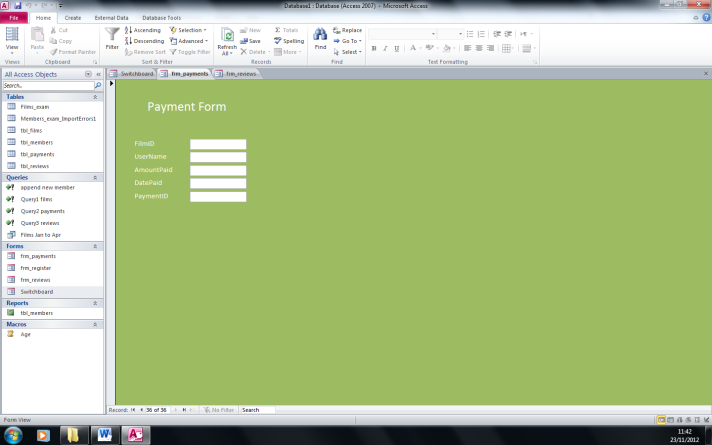

For my forms to work correctly, I
would do the same as what I did for the registration form and create a macro
and query which will make sure all the information needed is filled in and the
data from the form goes into the correct table.
The image below shows the
switchboard with each button on it that navigates to each form that is available
to fill out.

Other features I could add to the database is security. You can go to security settings which allows you to remove menus so users are not able to get into certain parts of the database and they cannot change things. You can also use passwords so unauthorised people cannot get into certain parts of the database.
Overall the database and all it's features worked correctly and it met the original intention.
Subscribe to:
Posts (Atom)