Tuesday, 16 October 2012
Tuesday, 9 October 2012
Wednesday, 3 October 2012
Wednesday, 26 September 2012
Unit 18 P2 Functional Specification and Data Dictionary
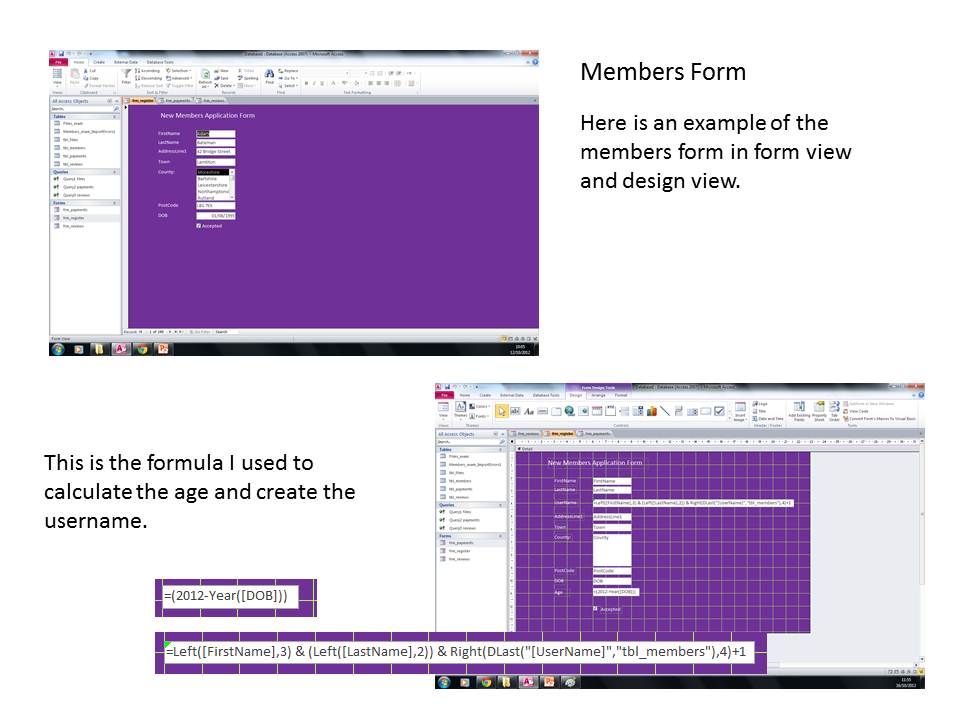
Validation in the application form, payment form and review form will include presence checks, using drop down choices/input masks and data type checks. These validation rules will make sure that all forms are filled out correctly and all data being put into the form are the correct type of data. It will also make sure that the data that is needed is put into the form and any data that isn’t put into the form, an error message shows which means the person must add in the information. Once the members form is completed successfully, they can then move onto the payment form, and then they have to go through the same process to go to the review form.
Data Type Dictionary
Text: This lets you write in text which can include text,
numbers and symbols
Number: This is for numbers and/or decimal numbers
Memo: This is used when there are long pieces of text going
into the data as it allows more characters than when just using text.
Date/Time: This only allows you to have numbers between 1-31
for days and 1-12 for months.
Currency: This makes data automatically turn into a currency
and puts the £, $ or euro sign up. It also automatically makes sure that the
decimal points are in the right places.
Auto Number: This automatically increases the number added
to the data base for example, when another person is registered, their username
will be a different number from the last person.
Yes/No: This means that the data can only be restricted to
either one of these answers.
Wednesday, 19 September 2012
D1 unit 18
There
are many common errors that can happen in database design but there are also
ways of avoiding these errors. One error that can occur in databases is the
deletion of fields/records. This is when some data can be deleted within the
database which means important information can be lost. To stop this from
happening, the database should be backed up regularly to allow all changes to
be saved and no information will be lost. Another way of stopping this error is
not working directly into the database. Another error that can occur in
databases is incorrect data types. This is when people put in data that isn’t
relevant which means the data being put into the database is invalid. It also
can happen when people use letters instead of numbers which means each bit of
data can be different to others within the database. A way of overcoming this
error is using input masks. An input mask only allows you to put a certain
amount of characters in a text box. For example, when entering card details,
there are spaces which only allow you to type in a certain amount of numbers
like when you write in your security code. Another way of overcoming this error
is using a drop down choice and multiple choices. By having this it means that
only certain information can be selected which means the correct data will be
put into the database. Another common error that can happen within a database
is renaming incorrectly. This is when people filling in their data or other people’s
data may spell things wrong which means the data will not be useful and will be
invalid. This could be overcome the same way as inputting incorrect data types
can be, by using input masks, drop down and multiple choices. Validation is
another common error that can come up when using a database. Data can sometimes
be put in wrong so a way of overcoming this is creating rules during the design
of the database. Some of these rules include only have a limited amount of
characters and batch totals. Batch totals check that there are no records empty
which means that all records have to be filled in. This means that all data
will be correct and all information that is needed will be in the database.
Another rule could be presence check. Presence check makes sure that all
important information is included in the database. For example, when filling
out forms, information that is needed is normally marked with an asterisk. Null
values are also a common error when designing a database. This is when records
are completely left and not filled in. This corresponds with validation rules.
A way of overcoming null values is combined with validation rules. For example,
when a field is not filled in, a rule could be that an error message comes up
asking to fill in the missing fields. This means that all information would be
in the database.
Wednesday, 12 September 2012
Subscribe to:
Posts (Atom)